A 140-person logistics company in Columbus had a problem that looked small and wasn't. Every purchase order that came in got retyped by hand into three separate systems: the ERP, a shipping tool, and a shared spreadsheet the finance team trusted more than either. Four employees spent roughly two hours a day on it. That's about 2,000 hours a year spent copying numbers from one screen to another, and a 4% error rate that turned into refund calls and angry emails downstream.
They didn't need a bigger team. They needed to stop doing the copying. That's what business process automation is really about, and it's why the category has quietly become one of the highest-ROI investments a mid-sized company can make in 2026.
What business process automation actually means
Business process automation (BPA) is the use of technology to run a multi-step business process end to end, with little or no human intervention. The key word is *process*. Not a task. Not a button. A process is a chain of steps that crosses tools, people, and decisions to produce an outcome the business cares about: an order fulfilled, an invoice paid, an employee onboarded, a refund issued.
A single automated task is useful. Automating the whole process is transformative, because most of the cost and most of the errors in an organization live in the hand-offs between steps, not in the steps themselves.
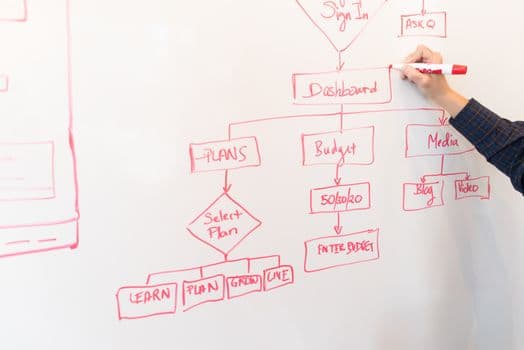
Here's the Columbus example reframed as a process:
- A purchase order arrives by email.
- Someone reads it and extracts the line items.
- They enter it into the ERP.
- They re-enter it into the shipping tool.
- They update the tracking spreadsheet.
- They email the customer a confirmation.
Six steps, four systems, one human doing all the connective tissue. BPA replaces the human as the connective tissue while keeping them in charge of the exceptions and the judgment calls.
BPA vs. RPA vs. workflow automation
These three terms get used interchangeably, and that confusion costs companies real money because they buy the wrong thing. Here's the clean way to separate them.
Workflow automation orchestrates the sequence. It's the "when this, then that" layer: when a form is submitted, route it to a manager for approval, then notify the requester. It handles routing, notifications, approvals, and status tracking. It moves work between people and systems but usually doesn't do the work inside each step. This is the backbone most companies start with, and our workflow automation practice is where a lot of BPA projects begin.
Robotic process automation (RPA) does the mechanical work inside a step. A software "bot" logs into an application, clicks the buttons, copies the fields, and pastes them into the next system, exactly the way a person would, but faster and without typos. RPA is brilliant at the retyping problem the Columbus company had. It's rule-based and deterministic: same input, same output, every time. If you have systems that don't talk to each other and no API to connect them, robotic process automation is often the fastest bridge.
Business process automation is the umbrella. It's the whole coordinated system: workflow automation routing the process, RPA doing the mechanical steps, integrations connecting the APIs that do exist, and increasingly AI handling the parts that require interpretation. A mature business process automation implementation uses all of these together, chosen step by step based on what each step actually needs.
The simplest mental model: workflow automation decides *where work goes*, RPA *does the clicking*, and BPA is *the entire machine* that gets an outcome produced.
Where to start (and where not to)
The most common way BPA projects fail is starting with the most visible process instead of the most suitable one. Executives point at the thing that annoys them in meetings. That thing is usually complex, political, and full of exceptions, which makes it the worst possible first project.
Score your candidate processes on four factors:
- Volume. How many times does this run per week? High volume means the savings compound. Automating something that happens twice a month rarely pays off.
- Rules. Is the logic clear and stable, or does it change constantly and rely on someone's gut? Clear, stable rules automate cleanly. Judgment-heavy processes need AI or should wait.
- Structure. Is the input predictable (a form, a standard file, a database record) or messy (freeform email, handwritten notes, phone calls)? Structured input is easier, though modern AI has widened what "structured enough" means.
- Pain. Is this causing errors, delays, compliance risk, or employee burnout? Pain justifies the investment and gets you buy-in.
The ideal first project is high-volume, rule-based, structured, and painful. Data entry between systems, report generation, invoice matching, and status updates almost always score well. Anything that requires negotiation, empathy, or novel judgment scores poorly and should stay human for now.
Start with one process. Prove the ROI. Use that win to fund the next three. Companies that try to automate everything at once tend to automate nothing well.
Calculating BPA ROI honestly
The vendor math is usually "hours saved times hourly wage." That number is real but incomplete, and it oversells in one direction while underselling in another.
It oversells because you rarely lay off the four people whose time you freed up. You redeploy them. The savings is real only if that redeployed time produces value, and only if you actually reassign it rather than letting it evaporate.
It undersells because the biggest returns from BPA are usually not labor hours at all. They're:
- Error reduction. The Columbus company's 4% error rate wasn't just rework; it was refunds, lost customers, and a finance team that didn't trust its own numbers. Cutting errors to near zero was worth more than the hours saved.
- Speed. A process that took two days now takes twenty minutes. Faster invoicing means faster cash collection. Faster onboarding means new hires productive sooner. Speed is often the line item finance cares about most.
- Capacity. BPA lets you handle 3x the volume without hiring 3x the people. For a growing company, that's the difference between scaling profitably and drowning.
- Auditability. Every automated step is logged. When a regulator or auditor asks "who approved this and when," you have an answer in seconds instead of a two-week email archaeology project.
A defensible ROI model includes all five: labor, errors, speed, capacity, and risk. When you add them up, payback periods of six to twelve months are common for well-chosen first projects. You can sanity-check the economics against real implementation costs on our pricing page rather than guessing.
Where AI changes the picture in 2026
For years, BPA hit a wall: the moment a process required reading unstructured content or making an interpretive judgment, you needed a human. That wall is coming down.
Modern AI automation can read a supplier email and understand what it's asking for, classify a support ticket by intent, extract data from a document that doesn't match any fixed template, and flag the transactions that look wrong. This means processes that were "too messy to automate" three years ago are now candidates.
The right pattern is a division of labor. Deterministic steps stay with RPA and integrations, because they're cheaper, faster, and perfectly predictable. The interpretive steps, reading, classifying, deciding, go to AI. And genuine exceptions still route to a human, but now it's the 5% of cases that need judgment instead of 100% of them. You get automation that's both reliable and flexible, which is exactly what the old rules-only approach couldn't deliver.
The Columbus company automated purchase-order entry in about seven weeks. RPA handled the retyping across the three systems. A small AI layer read the incoming PO emails and pulled out the line items regardless of which supplier format arrived. A human reviewed only the orders the AI flagged as ambiguous, about six a day instead of every single one. The four employees didn't lose their jobs; two moved to customer success, and the error rate dropped from 4% to under half a percent.
That's business process automation working the way it's supposed to: not replacing people with robots, but replacing tedium with reliability so people can do the work only people can do.
Frequently Asked Questions
Is business process automation only for large enterprises?
No. Mid-sized companies often see faster returns than enterprises because their processes are simpler and their decisions are quicker. The 140-person logistics company in the opening example is a far more typical BPA customer than a Fortune 500 firm. If you have a repetitive, rule-based process running dozens of times a week, you're a candidate regardless of headcount.
How long does a typical BPA project take?
A well-scoped first process usually goes live in six to ten weeks, including discovery, building, and testing. Broad "automate the whole department" programs take longer and carry more risk, which is exactly why we recommend starting with a single high-value process and expanding from proven wins.
What's the difference between BPA and just buying better software?
New software replaces one tool; BPA connects and coordinates the tools you already have. Most companies don't have a single-app problem, they have a between-apps problem, where work stalls in the hand-offs. BPA targets those hand-offs, which is why it often delivers more value than another software subscription.
Do we need to replace our existing systems to automate?
Rarely. RPA specifically exists to automate across systems that have no APIs and can't easily integrate, by operating them the way a person does. Integrations and workflow tools handle the systems that do connect. The goal is to work with your current stack, not force a costly rip-and-replace.
How do we know a process is a good automation candidate?
Score it on volume, rule clarity, input structure, and pain. High-volume, clearly-ruled, structured, and painful processes are ideal. Judgment-heavy, low-volume, or highly variable processes are poor first candidates, though AI has expanded what counts as automatable in 2026.